- Home Page /
- Electronics /
- Computer Accessories /
- Computer Accessories & Peripherals /
- Keyboards, Mice & Accessories /
- Keyboard & Mouse Combos /
- RAPOO Wireless Keyboard and Laser Mouse Combo...
0 ratings




Item #:
31717777
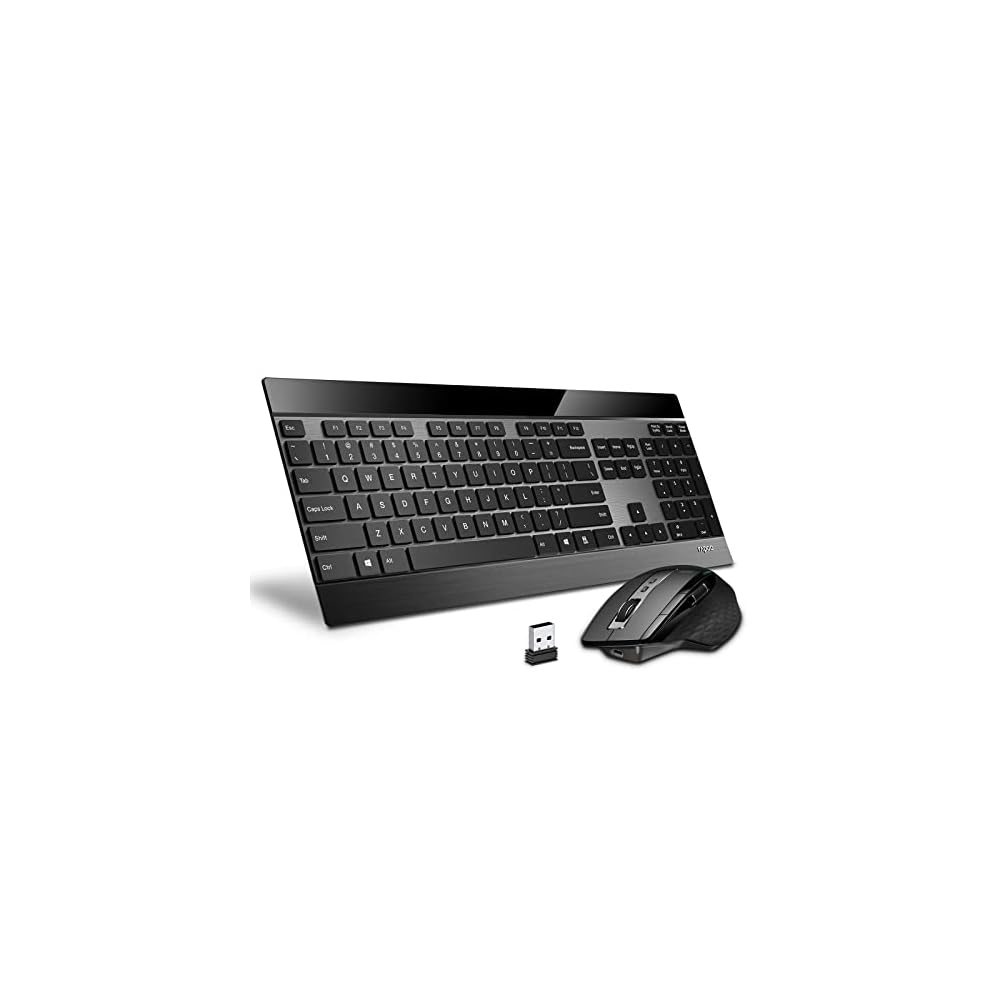
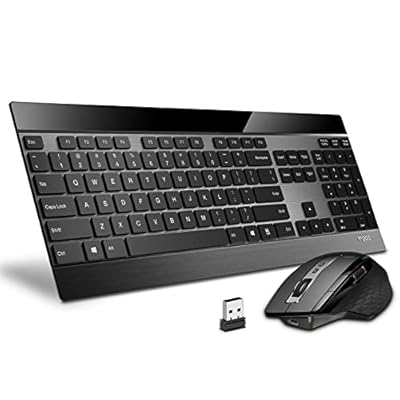
RAPOO Wireless Keyboard and Laser Mouse Combo,Multi Device (Bluetooth 4.0+3.0+2.4G) Keyboard and Mouse Set,Ultra-Slim Computer Keyboard Compact
Item #:
31717777
€ 56
Price Details
Excluding Shipping & Custom charges ( Shipping and custom charges will be calculated on checkout )
*All items will import from US
33%
In stock
 Imported from USA store
QTY:
Order now and get it around Wednesday, June 24
Secured transaction
Ubuy works hard to protect your security and privacy. Our advanced payment security system ensures confidentiality by encrypting your information during transmission using AES (Advanced Encryption Standards) and SSL (Secure Socket Layer) protocols. Your payment details are 100% secure as we do not share your payment details with third party sellers.
Our Top Logistics Partners


Reliable multi-device connection via Bluetooth 3.0, Bluetooth 4.0, 2.4G USB receiver. 4 devices can be switched freely by keyboard and mouse.

Fast
Shipping

Free
Return*

Secure Packaging

100% Original Products

PCI DSS Compliance

ISO 27001 Certified


Note: Step Down Voltage Transformer required for using electronics products of US store (110-120). Recommended power converters Buy Now.


What Stands Out
Multi-Device Connectivity
Easily connect to up to three devices via Bluetooth or 2.4G, enabling seamless switching for efficient multitasking across Windows, Android, and Mac OS environments.
Ultra-Slim Design
The sleek, compact form factor fits perfectly in any workspace, enhancing portability without compromising comfort or functionality for extended typing sessions.
Precision Laser Mouse
Experience superior tracking accuracy with the laser mouse, providing a smooth navigation experience on various surfaces, ideal for productive environments and professional use.
Product Details
- Reliable multi-device connection via Bluetooth 3.0, Bluetooth 4.0, 2.4G USB receiver
- Easy switching between up to 4 devices using the keyboard and mouse
- Minimal interference with other wireless, Bluetooth, and Wi-Fi devices
- Ultra-thin keyboard with a thickness of only 4.0mm
- Stylish and durable design with a stainless steel base and chic floating buttons
- Multi-functional wireless mouse with 8 custom buttons and 4 DPI levels for precision
| Connectivity Technology | Bluetooth, Usb |
| Compatible Devices | Laptop, Personal Computer, Smartphone, Tablet |
| Movement Detection | Laser |
| Are Batteries Required | Yes |
| Power Source | Battery Powered |
| Keyboard Layout | QWERTY |
| Number of Batteries | 2 AA batteries required. (included) |
| Compatible Operating System Family | Android, Windows |
| Hand Orientation | Ambidextrous |
| Operating System | Windows® XP/Vista/7/8/10 or later, USB port |
| Number of Keys | 104 |
| Brand | Rapoo |
| Keyboard Description | US |
| Manufacturer | Shenzhen Rapoo Technology Co., Ltd. |
| Model Number | 9900M-CA |
| Mfr Part Number | 9900M-CA |
| Color | Black |
| Item Weight | 1.5 lbs (680 grams) |
Who Should Buy?

-
Frequent Travelers
Lightweight and compact design makes it easy to carry, ideal for on-the-go professionals using multiple devices.
-
Multiple Device Users
Supports Bluetooth 4.0, 3.0, and 2.4G, allowing seamless connection across various devices like tablets and laptops.
-
Minimalist Enthusiasts
Ultra-slim design appeals to those who prefer a clean, clutter-free workspace without compromising functionality.

-
Gamers
May lack the responsiveness and features needed for intense gaming sessions compared to dedicated gaming peripherals.
-
Heavy Typists
Ultra-slim keys may not provide the tactile feedback some users prefer for long typing sessions or professional writing.
-
Budget-Conscious Shoppers
Could be considered pricey when compared to basic wired alternatives, which may fit budget restrictions better.
Product Description
Have any Query? Chat with us
Customer Questions & Answers
-
Question:
What are the main features of the RAPOO Multi Device Bluetooth 2.4G Wireless Keyboard and Mouse Combo?
Answer: The RAPOO Multi Device Bluetooth 2.4G Wireless Keyboard and Mouse Combo features a sleek, slim design tailored for Mac OS compatibility. The keyboard is rechargeable, offering a long-lasting battery life alongside silent keys for a quieter experience. The mouse has a 1600 DPI optical sensor, allowing for precise movements and improved accuracy. This combination enhances your workspace by providing a clutter-free solution while enabling seamless switching between multiple devices, such as your laptop and MacBook, making it perfect for productivity on the go. -
Question:
How do I connect the RAPOO Wireless Keyboard and Mouse to my devices?
Answer: Connecting the RAPOO Wireless Keyboard and Mouse is straightforward. Simply enable Bluetooth on your Mac OS device or use the 2.4G USB dongle for reliable connectivity. For Bluetooth pairing, switch on the keyboard and mouse, and press the Bluetooth pairing button. Your devices will appear in the Bluetooth settings; select them to establish a connection. This allows you to enjoy wireless freedom and switch between devices with ease, making it suitable for multitasking across different platforms. -
Question:
Is the RAPOO Wireless Keyboard compatible with other operating systems?
Answer: The RAPOO Multi Device Bluetooth Keyboard and Mouse Combo is primarily designed for Mac OS to ensure optimal performance and feature support. However, it also has limited compatibility with Windows and Android devices. Users have reported satisfactory functionality across different platforms, although some special Mac-specific keys may not work as intended on other systems. This versatility enables you to use the keyboard and mouse with various devices, enhancing your overall productivity. -
Question:
What is the battery life of the RAPOO Wireless Keyboard and Mouse?
Answer: The RAPOO Wireless Keyboard and Mouse Combo is equipped with a rechargeable battery designed for extended use. While specific battery life may vary based on usage, you can typically expect several weeks of operation on a full charge. The rechargeable feature is convenient, eliminating the need for constantly replacing batteries. Simply recharge when needed, ensuring that you can maintain your workflow without interruption, particularly during busy work hours. -
Question:
What benefits does the silent keyboard provide?
Answer: The silent keyboard feature of the RAPOO Combo is ideal for those who work in quiet environments or share spaces. The reduced noise level ensures that your typing doesn't disturb colleagues or family members. Additionally, this feature can enhance concentration and productivity as it creates a more serene working atmosphere. Whether you're typing reports at a cafe or working late at night, the quiet keys allow for focused work without distractions. -
Question:
Can I customize the keys on the RAPOO Keyboard?
Answer: The RAPOO Wireless Keyboard offers limited customization options. While you can assign different functions to some keys through various software, most of the keyboard's keys are preset for Mac OS functionalities, ensuring optimal use without additional configuration. This design simplifies the setup process, making it user-friendly right out of the box—perfect for users who appreciate straightforward functionality without extensive modifications. -
Question:
How does the mouse’s DPI setting impact performance?
Answer: The 1600 DPI setting of the RAPOO mouse allows for adjustable sensitivity, which significantly impacts your performance based on task requirements. A higher DPI ensures faster cursor movement across screens, suitable for graphic design or gaming, while a lower DPI allows for precise control in detailed tasks like photo editing. This flexibility makes it a versatile tool for different applications, offering the ability to switch between high-speed navigation and fine detail work effectively. -
Question:
Is the keyboard and mouse easy to carry for travel?
Answer: Yes, the RAPOO Wireless Keyboard and Mouse Combo is designed with portability in mind. Its slim profile allows for easy storage in a laptop bag, making it an excellent choice for professionals on the move. The wireless aspect reduces the clutter of cords, and the rechargeable battery adds convenience for a travel-friendly experience. Whether you're commuting for work or heading to a coffee shop, this combo ensures you can set up quickly and efficiently wherever you are. -
Question:
Does the RAPOO Wireless Keyboard require special software?
Answer: The RAPOO Wireless Keyboard and Mouse Combo does not require any special software for basic functionality. They are plug-and-play devices, meaning you can use them immediately after connecting via Bluetooth or the USB dongle. For advanced features such as key remapping or macros, additional software may be available from RAPOO’s official website. This simplicity ensures a hassle-free user experience, ideal for those who prefer straightforward devices without complicated setups. -
Question:
Where can I buy the RAPOO Multi Device Bluetooth 2.4G Wireless Keyboard and Mouse Combo?
Answer: You can purchase the RAPOO Multi Device Bluetooth 2.4G Wireless Keyboard and Mouse Combo through Ubuy in Croatia. Ubuy offers a seamless shopping experience, ensuring you have access to quality products delivered right to your door. Their platform provides detailed product descriptions and customer reviews, helping you make well-informed purchasing decisions.
Rapoo Keyboard & Mouse Combos 9900M-CA Editorial Review

This Rapoo keyboard and mouse combo has had mixed reviews. Users have praised the sleek metal finish on the base and the soft tactile response from the keys. However, some have found the switching of the Bluetooth connection to be inconvenient and the keys to be of lower quality than they expected or require. One user experienced issues with the mouse wheel, making scrolling sporadic and causing frustration. Another found that the "I" button did not work out of the box rendering the device useless. On the other hand, some users have found the mouse to be very comfortable and functional, and the keys on the keyboard to be low profile and sturdy, making it ideal for laptop users. The only criticism here is that there is no way to customize keys or backlit keys available.
Customer Reviews & Ratings
191 customers ratings
-
5 Star
59%
-
4 Star
14%
-
3 Star
12%
-
2 Star
3%
-
1 Star
12%
Review this product
Share your thoughts with other customers
Pros
- Sleek profile
- Soft tactile response from keys
- Comfortable mouse
- Low profile and sturdy keyboard ideal for laptop users
Cons
- Bluetooth connection slider position inconvenient
Related Categories
Related Brands
Product Price History
Important information
- Limitations : For products shipped internationally, please note that any manufacturer warranty may not be valid; manufacturer service options may not be available; product manuals, instructions, and safety warnings may not be in destination country languages; the products (and accompanying materials) may not be designed in accordance with destination country standards, specifications, and labeling requirements; and the products may not conform to destination country voltage and other electrical standards (requiring use of an adapter or converter if appropriate). The recipient is responsible for assuring that the product can be lawfully imported to the destination country. When ordering from Ubuy or its affiliates, the recipient is the importer of record and must comply with all laws and regulations of the destination country.
- Not all the products listed on Ubuy are for sale, as Ubuy is a global search engine. Products are subject to export/trade regulations.
€ 56
Order now and get it around Wednesday, June 24
This item is not restrict in my country.(Please click on above link if this item is not restrict in your country, So our team will review and allow.)
QTY:
Secured transaction
Ubuy works hard to protect your security and privacy. Our advanced payment security system ensures confidentiality by encrypting your information during transmission using AES (Advanced Encryption Standards) and SSL (Secure Socket Layer) protocols. Your payment details are 100% secure as we do not share your payment details with third party sellers.
Our Top Logistics Partners
Fastest cross-border delivery
Features & Benefits
- Multi-device connection for up to 4 devices
- Wireless transmission guarantees minimal interference
- Ultra-thin keyboard design at only 4.0mm thick
- Stainless steel base and precise scissor key structure for durability
- 8 custom button mouse with laser engine and PTFE foot pad
- Suitable for various surfaces without a mouse pad required