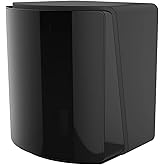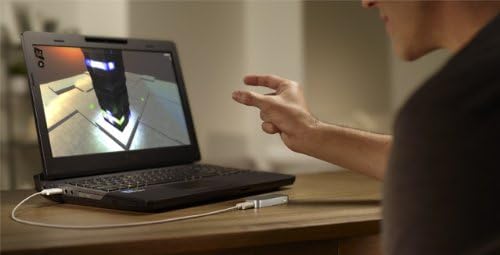
Leap Motion Controller, Gesture Motion Control for PC or MAC
Leap Motion’s software and hardware Platform brings your bare hands directly into virtual and augmented reality.
Leap Motion Controller, Gesture Motion Control for PC or MAC
Stavka #: 326241

Leap Motion Controller, Gesture Motion Control for PC or MAC

Stavka #: 326241

€ 286

Price Details

Excluding Shipping & Custom charges ( Shipping and custom charges will be calculated on checkout )

*All items will import from SAD

Na lageru
SAD Uvezeno iz USA trgovine

QTY:

Na zalihi je ostalo samo 3 artikala.
Naručite sada i dobijte ga oko Subota, Kolovoz 08
Our Top Logistics Partners
  • fedex
  • dhl
Leap Motion’s software and hardware Platform brings your bare hands directly into virtual and augmented reality.
U-Care jamstvo:
Nijedan
Odaberite plan
fast shipping

Fast
Shipping

free return

Free
Return*

secure packaging

Secure Packaging

100% original products

100% Original Products

pci-dss

PCI DSS Compliance

iso certified

ISO 27001 Certified


paypal payment
visa payment
mastercard payment
Note: Step Down Voltage Transformer required for using electronics products of SAD store (110-120). Recommended power converters Kupi sada.

What Stands Out

Gesture Recognition
This controller uses advanced gesture technology, allowing users to navigate effortlessly, making it ideal for gaming and presentations without the need for traditional input devices.
Cross-Platform Compatibility
Designed for both PC and MAC, this motion control device ensures seamless integration and usability across multiple systems, providing versatility for users with different setups.
Enhanced User Experience
By offering intuitive motion controls, this product enhances gameplay and productivity, providing an immersive experience that traditional controllers cannot match, leading to higher engagement.

Detalji o proizvodu

Explore and buy the Leap Motion Controller on Ubuy Croatia. Experience gesture motion control for your PC or MAC. Enhance your digital interactions now.
  • The Leap Motion Controller senses your hands and fingers and follows their every move.
  • It lets them move in all that wide-open space between you and your computer. So you can do almost anything without touching anything
  • It’s the tiny device that just might change the way you use technology.
  • It's a super-wide 150° field of view and a Z-axis for depth. That means you can move your hands in 3D, just like you do in the real world.
  • The Leap Motion Controller can track your movements at a rate of over 200 frames per second.
Compatible DevicesMac, PC
Controller TypeHand Tracking
Connectivity TechnologyUSB
Additional FeaturesWireless
Button Quantity16
Hardware PlatformLinux, Mac, PC
Power SourceWireless
Package Quantity1
Item Dimensions1.2 x 3.2 x 0.5 inches (3 x 8.1 x 1.3 cm)
ColorSilver
Brand NameLeap Motion
Model NameLeap Motion Controller
ManufacturerLeap Motion
Global Trade Identification Number00857192004015
UPC857192004046 857192004015 857192004039
Model Number90-0002
Manufacturer Part Number90-0002
Item Type NameHand Tracking Device
BrandLeap-Motion
Package Weight1.27 Pound

Who Should Buy?

Suitable For
  • Gamers

    Provides an immersive experience for gamers who enjoy gesture-based controls in action and sports games.

  • Fitness Enthusiasts

    Ideal for fitness programs that incorporate motion-tracking games to make workouts more engaging and interactive.

  • Developers

    Useful for developers creating applications or games that require innovative gesture recognition and motion control functionalities.

Not Suitable For
  • Traditional Gamers

    Players who prefer traditional controllers or keyboard and mouse setups may find this product unnecessary and inconvenient.

  • Serious Workers

    Professionals seeking precise control and productivity might find gesture controls too imprecise for detailed work tasks.

  • Budget Shoppers

    Individuals with limited budgets might want to explore more affordable, traditional input devices providing reliable performance.

OPIS PROIZVODA

About This Item

Introducing the Leap Motion Controller - the cutting-edge gesture motion control device that takes your PC or Mac experience to a whole new level. Designed to revolutionize the way you interact with your computer, this motion control technology offers an unparalleled level of precision and responsiveness. With the Leap Motion Controller, you can effortlessly navigate your computer using hand and finger gestures. Simply plug it into your computer and watch as it turns any flat surface into a virtual control interface.

Say goodbye to tedious mouse clicks and keyboard commands - now you can manipulate objects, browse the web, and control applications with simple hand movements. This motion control device is not limited to gaming enthusiasts. While it offers an immersive motion control gaming experience, its applications extend far beyond that. Whether you're an artist, designer, developer, or simply a tech-savvy individual, the Leap Motion Controller opens up a world of possibilities.

Use it to create stunning 3D models, explore virtual reality environments, or enhance your productivity with intuitive gestures. The Leap Motion Controller is equipped with advanced motion control software that captures the slightest movements of your hands with exceptional accuracy. Its motion control sensor employs state-of-the-art technology to track your hands and fingers with precision, ensuring seamless and natural interactions. Experience a new level of immersion with motion control gaming. Whether you're playing action-packed games or exploring virtual worlds, the Leap Motion Controller offers unparalleled responsiveness, allowing you to truly become a part of the game. Join the multitude of users who are already enjoying the benefits of this motion control interface.

Take control of your digital world with the Leap Motion Controller and discover a new dimension of interaction. Note: In order to use the Leap Motion Controller, your computer must meet the system requirements specified by the manufacturer. Please refer to the product documentation for more information. Upgrade your computer experience today with the Leap Motion Controller and embrace the power of motion control technology.

Imate li pitanja? Cavrljajte s nama

Pitanja i odgovori kupaca

  • pitanje: What is a Controller, Gesture Motion Control for PC or MAC?

    odgovor: A Controller with Gesture Motion Control allows users to interact with their PC or MAC through intuitive hand gestures rather than traditional keyboard and mouse usage. This tech is similar to gaming controllers but focuses on motion detection, enabling users to navigate, scroll, and play games more interactively. For example, during gaming sessions, a simple wave of your hand can trigger in-game actions, making it more immersive and engaging.
  • pitanje: How do I connect the Controller to my PC or MAC?

    odgovor: Connecting a Gesture Motion Controller is straightforward, requiring either USB ports or Bluetooth. For USB models, simply plug the receiver into your device. For Bluetooth-enabled controllers, turn on the device, put it in pairing mode, and search for it in your system's Bluetooth settings. This seamless connection allows users to start using the controller almost instantly, enhancing your computing experience, especially in gaming or creative applications.
  • pitanje: What games are compatible with Gesture Motion Controllers?

    odgovor: Many games are compatible with Gesture Motion Controllers, particularly those designed for motion tracking or virtual reality experiences. Titles include various action games, educational simulations, and custom apps created to leverage gesture controls. For instance, you may enjoy enhanced gameplay in VR environments where hand motions can replace standard inputs, providing a unique immersive experience that traditional controls cannot match.
  • pitanje: Can I use Gesture Motion Control for software applications?

    odgovor: Yes, Gesture Motion Controllers can be utilized for various software applications beyond gaming, such as design software, presentation tools, and video editing programs. Gestures can perform actions like scrolling through slides, zooming in on design elements, or editing video clips precisely. This access increases productivity and creativity, making routine tasks entertaining and interactive by allowing you to manipulate software interface naturally.
  • pitanje: Is there a learning curve associated with using Gesture Motion Control?

    odgovor: While users may experience a slight learning curve when transitioning from traditional controls, most find Gesture Motion Control intuitive. The design aims to mimic natural hand movements, allowing for a quick adaptation period. Users often report feeling more comfortable in just a few sessions, enhancing their overall experience and enjoyment in gaming and other applications as they become accustomed to the gestures required for various functionalities.
  • pitanje: What features should I look for in a high-quality Gesture Motion Controller?

    odgovor: When selecting a Gesture Motion Controller, consider features such as responsiveness, range of motion detection, button configuration, build quality, and compatibility with your devices. A reliable controller should offer lag-free performance and detect subtle movements effectively. For instance, responsive controllers provide a smoother experience in fast-paced games or detailed design processes, ultimately contributing to a more engaging user experience.
  • pitanje: Can multiple users use the same Gesture Motion Controller?

    odgovor: Yes, multiple users can utilize the same Gesture Motion Controller, but it typically requires each user to configure their settings and profiles. This feature is particularly beneficial in a shared environment, such as family gaming or collaborative projects. Each person can customize their gestures and functions, making it convenient for multiple users without needing additional hardware, thus promoting a versatile experience for everyone.
  • pitanje: Are there any limitations to using Gesture Motion Controls?

    odgovor: Gesture Motion Controllers may have some limitations, such as precise control over fine tasks or multiple gestures recognition, especially in fast-paced scenarios. Certain games or applications might not fully support all gestures or functions. Users often find that while it excels in enhancing immersive gameplay, there are moments where traditional controls can provide finer adjustments, particularly in competitive gaming or high-stakes environments.
  • pitanje: What are the benefits of using a Controller with Gesture Motion Control over traditional input devices?

    odgovor: Gesture Motion Control offers several advantages, such as increased engagement, a more natural user experience, and the ability to interact with digital environments seamlessly. Unlike traditional input devices, gesture controls make activities like gaming and creative work feel more instinctual. For example, designing on graphically intensive software can be more fluid, allowing for spontaneous ideas to flow without the interruption of managing multiple devices.
  • pitanje: Where can I buy Controller, Gesture Motion Control for PC or MAC in Croatia?

    odgovor: You can purchase the Controller, Gesture Motion Control for PC or MAC at Ubuy, which provides a wide range of options along with product descriptions, reviews, and efficient service. Ubuy offers a reliable platform to find such innovative technologies, ensuring that you can make an informed choice based on your specific needs.

Leap Motion PC 90-0002 Editorial Review

Nije pronađena urednička recenzija

Customer Reviews & Ratings

4.1
202 ocjene kupaca
  • 5 zvjezdica
    58%
  • 4 zvjezdica
    18%
  • 3 zvjezdica
    7%
  • 2 zvjezdica
    8%
  • 1 zvjezdica
    9%

Recenzirajte ovaj proizvod

Podijelite svoje misli s drugim kupcima

Platform Trust & Buyer Confidence

trustpilot logo
4.3/5 9,000 + reviews
Read reviews
MT
Mohd
Verified buyer

“The product received very good packaging & safe…Thank You”

16 June 2026 · via Trustpilot
SJ
Shawati
Verified buyer

“Accurate delivery timing given”

16 June 2026 · via Trustpilot
YB
Youcef
Verified buyer

“Not madly expensive like I thought, and much quicker than promised.”

15 June 2026 · via Trustpilot
LM
Leila
Verified buyer

“Never dealt with Ubuy before, but everything worked out great. Seamless cross border purchasing and shipping. Thanks!”

6/7/2026 · via Trustpilot
KA
Kwame
Verified buyer

“The process was smooth, with clear communication and timelines. This was my 1st purchase and I am really impressed. I will definitely be coming back.”

12 June 2026 · via Trustpilot
Sigurno plaćanje Global Delivery Easy Returns Genuine Products

Product Price History

Važne informacije

  • Ograničenja: imajte na umu da jamstvo možda ne vrijedi za proizvode koji se dostavljaju u inozemstvo; servis možda neće biti dostupan; priručnici proizvoda, upute i sigurnosna upozorenja možda nisu na jeziku zemlje odredišta; proizvodi (i prateći materijali) možda nisu u skladu sa standardima, specifikacijama i zahtjevima za označavanje zemlje odredišta; proizvod možda nije usklađen s naponom struje i drugim električnim standardima (zbog čega će možda trebati adapter ili pretvarač). Primatelj je odgovoran za provjeru može li proizvod prema važećim zakonima biti uvezen u zemlju odredišta. Kad naručujete od Ubuya ili njegovih partnera, primatelj se smatra registriranim uvoznikom i mora se pridržavati svih zakona i propisa zemlje odredišta.
  • Svi proizvodi navedeni na Ubuyu nisu za prodaju, jer je Ubuy globalna tražilica. Proizvodi podliježu propisima o izvozu i trgovini.