0 ratings





Stavka #:
118569320
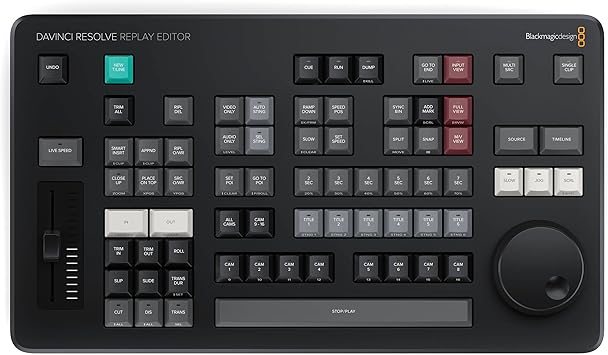
Blackmagic Design Davinci Resolve Replay Editor (DV/RES/BBPNLMLEKAR)
Stavka #:
118569320
€ 633
Price Details
Excluding Shipping & Custom charges ( Shipping and custom charges will be calculated on checkout )
*All items will import from SAD
0 ratings
Napišite recenziju
Na lageru
 Uvezeno iz USA trgovine
QTY:
Na zalihi je ostalo samo 4 artikala.
Naručite sada i dobijte ga oko Petak, Srpanj 10
Secured transaction
Ubuy works hard to protect your security and privacy. Our advanced payment security system ensures confidentiality by encrypting your information during transmission using AES (Advanced Encryption Standards) and SSL (Secure Socket Layer) protocols. Your payment details are 100% secure as we do not share your payment details with third party sellers.
Our Top Logistics Partners


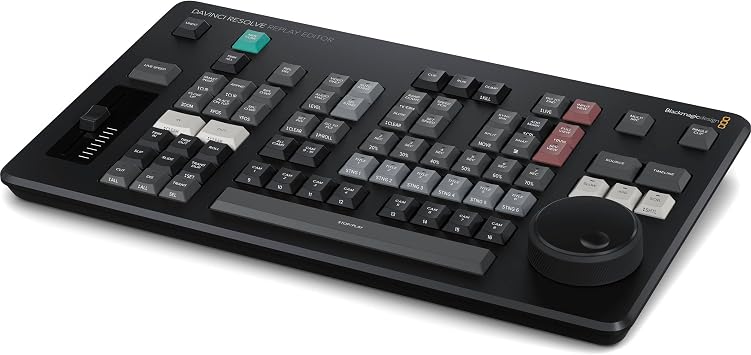
The Blackmagic Design DaVinci Replay Resolve Editor is specifically designed for multi-cam editing, delivering fast and efficient editing for news cutting and live sports replay.

Fast
Shipping

Free
Return*

Secure Packaging

100% Original Products

PCI DSS Compliance

ISO 27001 Certified


Note: Step Down Voltage Transformer required for using electronics products of SAD store (110-120). Recommended power converters Kupi sada.


Detalji o proizvodu
- Multi-Cam Editing: The Blackmagic Design DaVinci Replay Resolve Editor is an editor panel specifically designed for multi-cam editing for news cutting and live sports replay
- Fast and Efficient: It includes buttons to make camera selection and editing extremely fast. It connects via Bluetooth or USB‑C
- Unlimited Storage: The Blackmagic Cloud Store Max has been designed for replay because it's fast and has a large capacity. So it easily handles multiple record channels
- Replay Palette: The replay controls can be accessed using the replay palette above the viewer, plus there are also dedicated buttons on the DaVinci Resolve Replay Panel for quick control
- Unlimited Record Channels: By adding multiple HyperDeck recorders to a Blackmagic Cloud Store Mini or Max, you can record as many channels as you need
| Product Dimensions (L x W x H) | 8.54 x 14.96 x 1.73 inches (21.7 x 38 x 4.4 cm) |
| Item Weight | 3.56 pounds (1.61 kg) |
| Item model number | BM-DV/RES/BBPNLMLEKAR |
| Date First Available | August 6, 2024 |
| Manufacturer | Blackmagic Design |
OPIS PROIZVODA
Imate li pitanja? Cavrljajte s nama
Pitanja i odgovori kupaca
-
pitanje:
What are the main features of the Blackmagic Design Davinci Replay Resolve Editor?
odgovor: The Blackmagic Design Davinci Replay Resolve Editor is renowned for its fast multi-cam editing capabilities, tailored specifically for news cutting and live sports replay. It offers real-time playback of multiple camera angles, advanced color correction tools, and robust audio editing functionalities. A standout aspect is its user interface, designed for efficiency during live events, allowing editors to switch between angles seamlessly. This makes it ideal for fast-paced environments such as sports broadcasts or live news reports, where every second counts. -
pitanje:
Is the Blackmagic Design Davinci Replay Resolve Editor user-friendly for beginners?
odgovor: Yes, the Blackmagic Design Davinci Replay Resolve Editor offers a user-friendly interface that caters to both beginners and professionals. While it comes with advanced features suited for intricate editing tasks, the layout is intuitive, allowing newcomers to quickly familiarize themselves with the dashboard and workflow. Tutorials and community forums further support users in honing their skills, making the editor a versatile choice for anyone from hobbyists to seasoned video editors. -
pitanje:
Can I integrate the Blackmagic Design Davinci Replay Resolve Editor with other software?
odgovor: Absolutely, the Blackmagic Design Davinci Replay Resolve Editor supports integration with various software and systems. This compatibility ensures that you can import footage from different editing tools and seamlessly transition into your multi-cam editing workflow. For instance, users frequently integrate with software like Adobe Premiere Pro for enhanced functionality, allowing a smooth workflow across different platforms, especially useful in professional environments where collaboration is key. -
pitanje:
What types of projects is the Davinci Replay Resolve ideal for?
odgovor: The Davinci Replay Resolve Editor is optimal for projects such as live sports broadcasting, news production, and event coverage. Its multi-cam editing feature specifically caters to scenarios requiring quick cuts and seamless transitions between various camera angles. For example, during a sports game, editors can effortlessly switch between the field's multiple live feeds, ensuring viewers catch every exciting moment in real time, making it the go-to tool for fast-paced editing environments. -
pitanje:
Does the Davinci Replay Resolve support various video formats?
odgovor: Yes, the Davinci Replay Resolve Editor supports a wide range of video formats, making it versatile for different types of media. It handles formats like ProRes, DNxHD, and H.264 seamlessly, enabling editors to work with various source materials. This flexibility is crucial in environments like news and sports, where files from multiple cameras and sources need to be integrated quickly without compromising quality or performance. -
pitanje:
What hardware requirements are necessary to run the Davinci Replay Resolve Editor optimally?
odgovor: To run the Blackmagic Design Davinci Replay Resolve Editor optimally, a powerful computer is recommended. Ideally, it should have a multi-core processor, at least 16GB of RAM, and a dedicated GPU for handling high-resolution video editing smoothly. For professional use, consider configurations that meet or exceed these specifications, particularly if managing multiple camera feeds simultaneously. This ensures a lag-free experience during live editing sessions, which is crucial for maintaining quality in fast-paced productions. -
pitanje:
Can I use the Davinci Replay Resolve Editor for color grading?
odgovor: Yes, the Davinci Replay Resolve Editor is well-regarded for its advanced color grading capabilities. It provides robust tools that allow users to adjust color balance, contrast, and saturation in real time, which is essential for live broadcasts. This feature is particularly useful during sports events, where different lighting conditions can affect cameras’ appearances. Editors can ensure a consistent and polished look across all footage while maintaining the vibrancy needed for engaging live viewing. -
pitanje:
How does the live switching feature work in the Davinci Replay Resolve Editor?
odgovor: The live switching feature in the Davinci Replay Resolve Editor allows editors to transition between multiple camera feeds in real-time. This is accomplished through a dedicated control panel that enables instant cuts or transitions, giving the operator the flexibility to choose the best angle while the event is unfolding. This capability is particularly vital in live sports or event coverage, where quick decision-making and seamless transitions enhance viewer engagement and contribute to a more dynamic production. -
pitanje:
Where can I buy the Blackmagic Design Davinci Replay Resolve Editor in Croatia?
odgovor: You can purchase the Blackmagic Design Davinci Replay Resolve Editor from Ubuy in Croatia. Ubuy offers a comprehensive range of Blackmagic products, ensuring you have access to the latest versions and updates. The platform also provides a user-friendly shopping experience, making it convenient for you to find and acquire the replay editor you need to enhance your video editing projects.
Blackmagic Design Pop Filters BM-DV/RES/BBPNLMLEKAR Editorial Review
Nije pronađena urednička recenzija
Customer Reviews & Ratings
4 ocjene kupaca
-
5 zvjezdica
100%
-
4 zvjezdica
0%
-
3 zvjezdica
0%
-
2 zvjezdica
0%
-
1 zvjezdica
0%
Recenzirajte ovaj proizvod
Podijelite svoje misli s drugim kupcima
Pros
- Fast multi-camera editing
- Excellent for live sports replay
- User-friendly interface
- High-quality video output
- Great support and resources
Protiv
- Requires a powerful computer for optimal performance.
Product Price History
Važne informacije
- Ograničenja: imajte na umu da jamstvo možda ne vrijedi za proizvode koji se dostavljaju u inozemstvo; servis možda neće biti dostupan; priručnici proizvoda, upute i sigurnosna upozorenja možda nisu na jeziku zemlje odredišta; proizvodi (i prateći materijali) možda nisu u skladu sa standardima, specifikacijama i zahtjevima za označavanje zemlje odredišta; proizvod možda nije usklađen s naponom struje i drugim električnim standardima (zbog čega će možda trebati adapter ili pretvarač). Primatelj je odgovoran za provjeru može li proizvod prema važećim zakonima biti uvezen u zemlju odredišta. Kad naručujete od Ubuya ili njegovih partnera, primatelj se smatra registriranim uvoznikom i mora se pridržavati svih zakona i propisa zemlje odredišta.
- Svi proizvodi navedeni na Ubuyu nisu za prodaju, jer je Ubuy globalna tražilica. Proizvodi podliježu propisima o izvozu i trgovini.
€ 633
Naručite sada i dobijte ga oko Petak, Srpanj 10
This item is not restrict in my country.(Please click on above link if this item is not restrict in your country, So our team will review and allow.)
QTY:
Na zalihi je ostalo samo 4 artikala.
Secured transaction
Ubuy works hard to protect your security and privacy. Our advanced payment security system ensures confidentiality by encrypting your information during transmission using AES (Advanced Encryption Standards) and SSL (Secure Socket Layer) protocols. Your payment details are 100% secure as we do not share your payment details with third party sellers.
Our Top Logistics Partners
Fastest cross-border delivery
Značajke i prednosti
- Designed for multi-cam editing with quick access to replay controls.
- Fast and efficient editing with dedicated buttons for camera selection.
- Connects easily via Bluetooth or USB-C for seamless operation.
- Unlimited storage capacity with Blackmagic Cloud Store for handling multiple record channels.
- Ideal for news cutting and live sports replay, enhancing production workflow.
- Includes a replay palette for quick control over editing tasks.