0 ratings


Stavka #:
220515945
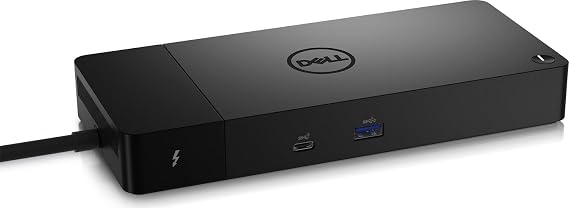
Dell ThunderBolt 4 Dock (WD22TB4), Black
78% of respondents would recommend this to a friend
Stavka #:
220515945
€ 191
Price Details
Excluding Shipping & Custom charges ( Shipping and custom charges will be calculated on checkout )
*All items will import from SAD
0 ratings
Napišite recenziju
Na lageru
 Uvezeno iz USA trgovine
QTY:
Naručite sada i dobijte ga oko Četvrtak, Rujan 24
Secured transaction
Ubuy works hard to protect your security and privacy. Our advanced payment security system ensures confidentiality by encrypting your information during transmission using AES (Advanced Encryption Standards) and SSL (Secure Socket Layer) protocols. Your payment details are 100% secure as we do not share your payment details with third party sellers.
Our Top Logistics Partners


Multiply Productivity: Connect displays and peripherals to your system with a single cable for ultimate productivity.

Fast
Shipping

Free
Return*

Secure Packaging

100% Original Products

PCI DSS Compliance

ISO 27001 Certified



Note: Step Down Voltage Transformer required for using electronics products of SAD store (110-120). Recommended power converters Kupi sada.


What Stands Out
Versatile Connectivity
The Dell ThunderBolt 4 Dock WD22TB4 offers multiple ports including USB-C, USB-A, HDMI, and Ethernet, ensuring seamless connectivity to a variety of devices for home or office use.
High-Speed Data Transfer
With Thunderbolt 4 technology, this dock enables data transfer speeds of up to 40 Gbps, allowing users to quickly transfer large files and enhance productivity without lag.
Dual 4K Display Support
Supports dual 4K displays, enabling an expansive workspace for multitasking and improved efficiency, making it ideal for graphic designers, video editors, and professionals needing high-resolution output.
Detalji o proizvodu
| Package Weight | 4.34 Pound |
Who Should Buy?

-
Remote Workers
Ideal for remote workers needing multiple connectivity options for laptops, enhancing productivity and workspace organization.
-
Content Creators
Great for video editors and graphic designers requiring high data transfer speeds and multiple display support.
-
Gamers
Designed for gamers using laptops, offering fast data transfer and multiple peripherals support for an enhanced gaming experience.

-
Casual Users
Not suitable for casual users needing only basic connectivity, as features may be excessive for their requirements.
OPIS PROIZVODA
Dell ThunderBolt 4 Dock (WD22TB4), Black
Imate li pitanja? Cavrljajte s nama
Pitanja i odgovori kupaca
-
pitanje:
Kako kupovati Dell ThunderBolt 4 Dock (WD22TB4), Black online od Ubuya?
odgovor: Jednostavno je kupovati Dell ThunderBolt 4 Dock (WD22TB4), Black online s Ubuya.. Samo trebate potražiti proizvod, odabrati način dostave tijekom odjave i dobiti ga na svoju lokaciju. -
pitanje:
Je li Dell ThunderBolt 4 Dock (WD22TB4), Black dostupan za online kupnju u Croatia?
odgovor: Da, na Ubuyu Croatia ovaj proizvod vam je dostupan za kupnju po razumnoj cijeni.. Dell ThunderBolt 4 Dock (WD22TB4), Black nije dostupan lokalno, ali možete nam povjeriti naše usluge ekspresne dostave. -
pitanje:
Koliko dugo je potrebno da dobijete proizvod nakon narudžbe?
odgovor: Vrijeme isporuke vašeg naručenog proizvoda ovisi o tome što ste naručili i načinu dostave koji ste odabrali.. Predviđeno vrijeme dostave navedeno je tijekom procesa naplate, stoga budite bezbrižni prilikom kupovine.
Dell Docking Stations Editorial Review
Dell ThunderBolt 4 Dock (WD22TB4), Black is tailored for Dell, HDMI, Thunderbolt, and USB C compatibility, making it an efficient connection hub for modern setups. Users have reported it functioning seamlessly with dual monitors and providing swift laptop charging. However, some buyers have raised concerns over connectivity issues with Ethernet and audio devices, which can often be resolved with a simple reboot while connected. The dock's limited USB-A ports may also frustrate users with multiple peripherals, necessitating additional adapters. Overall, this docking station is most effective within the Dell ecosystem, providing excellent performance when appropriately configured.
Customer Reviews & Ratings
1 ocjene kupaca
-
5 zvjezdica
100%
-
4 zvjezdica
0%
-
3 zvjezdica
0%
-
2 zvjezdica
0%
-
1 zvjezdica
0%
Recenzirajte ovaj proizvod
Podijelite svoje misli s drugim kupcima
Pros
- Works well with dual monitor setups
- Fast charging capabilities
- Supports Thunderbolt 4 connections
- Compact design fits various spaces
- Reliable for Dell laptops
Protiv
- Limited USB-A ports for multiple devices
Product Price History
Važne informacije
- Ograničenja: imajte na umu da jamstvo možda ne vrijedi za proizvode koji se dostavljaju u inozemstvo; servis možda neće biti dostupan; priručnici proizvoda, upute i sigurnosna upozorenja možda nisu na jeziku zemlje odredišta; proizvodi (i prateći materijali) možda nisu u skladu sa standardima, specifikacijama i zahtjevima za označavanje zemlje odredišta; proizvod možda nije usklađen s naponom struje i drugim električnim standardima (zbog čega će možda trebati adapter ili pretvarač). Primatelj je odgovoran za provjeru može li proizvod prema važećim zakonima biti uvezen u zemlju odredišta. Kad naručujete od Ubuya ili njegovih partnera, primatelj se smatra registriranim uvoznikom i mora se pridržavati svih zakona i propisa zemlje odredišta.
- Svi proizvodi navedeni na Ubuyu nisu za prodaju, jer je Ubuy globalna tražilica. Proizvodi podliježu propisima o izvozu i trgovini.
€ 191
Naručite sada i dobijte ga oko Četvrtak, Rujan 24
This item is not restrict in my country.(Please click on above link if this item is not restrict in your country, So our team will review and allow.)
QTY:
Secured transaction
PCI DSS compliant and ISO 27001:2022 certified, with encrypted payments and full buyer protection on every order.
Our Top Logistics Partners
Fastest cross-border delivery
Značajke i prednosti
- Modular design for easy upgrades with swappable modules.
- Features 2 x Thunderbolt-4 ports for high connectivity.
- Fast charging technology with SuperBoost capabilities.
- Supports multiple 4K displays and Thunderbolt peripherals.
- Data transfer speeds up to 40 GB/s for maximum efficiency.
- Compatible with Windows 10 and Windows 11 systems.
Ubuy Assurance
Experience worry-free shopping with 100% original products, PCI DSS-compliant payment security, ISO 27001-certified data protection, the fastest cross-border delivery, free returns *, and secure packaging on every order.